
PIEEG Low-cost Brain-computer interface (EEG, EMG, and ECG)


PIEEG Low-cost Brain-computer interface (EEG, EMG, and ECG)
How to Use Deep Learning for Stress Control via EEG
If you want to create an EEG-based classifier for deep learning, here’s a short guide
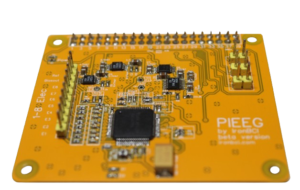
To read EEG data, we used our PiEEG device (a low-cost software open-source, 8-channel Brain-Brain computer interface)
1. Collect EEG Datasets
Collecting a dataset and labelling it is quite a complicated task for all neuroscience research. So, let’s use stress control. You can collect a dataset in the morning and the evening after work, or, to make it shorter, just watch some negative movies. Use this Script in Python to save data from the PiEEG device for both stress and no stress.
Data should be as clean as possible. Here are recommendations on how to receive clean EEG data
Data has the following Format in the Excel File (example of dataset)

You need (as an example), gather as many datasets as, for example, 50 datasets (1 minute or more each) for stress and 50 datasets (1 minute or more each) for no stress conditions.
2. Compute Power in Key Frequency Bands
Using raw EEG data alone for machine learning to detect stress is generally not optimal. Instead, extracting and analyzing alpha power from EEG signals provides more reliable insights into stress levels. Research consistently shows that alpha power decreases under stress, especially in the frontal and parietal lobes, while it increases during relaxation. This pattern makes alpha power a robust feature for stress detection models.
Additionally, it is crucial to remove strong noise artefacts from the EEG data before analysis, as artefacts can significantly distort the results and reduce the accuracy of stress detection. Preprocessing steps such as filtering and artefact rejection are essential to ensure data quality.
In summary:
Analysis is more effective for stress detection than using raw EEG data.
To remove noise is necessary for accurate results.
These steps are supported by recent systematic reviews and experimental studies in the field of EEG-based stress assessment
We have a course on Udemy on how to make signal processing for EEG data (free for PiEEG users, contact to pieeg@pieeg.com)
To convert EEG data to alpha power for machine learning analysis, you can use a script from the PiEEG GitHub repository, as described in the PiEEG instructions. Here’s a clear workflow based on your context and the provided source:
Calculate power in the alpha band (8–12 Hz) for all 100 datasets. You can also compute power in other bands (beta, delta, theta) if needed.
Use a 1-second window to segment your EEG data and compute alpha power for each segment.
After processing, you should have:
50 datasets with alpha power values labeled as “stress”
50 datasets with alpha power values labeled as “not stress”
The power values for each segment will look like a sequence of numbers (e.g., “), representing the alpha power in each 1-second window.
Important details:
Make sure your data is free from strong noise artefacts before calculating power.
Combine the alpha power values into two separate files (Excel or CSV): one for “stress” and one for “non-stress.” Add a column for the record number (subject or episode) and a column for the label (1 for stress, 0 for no stress).
This structure is suitable for further machine learning analysis.
For the actual computation, the Welch method or Fast Fourier Transform (FFT) is commonly used to estimate power in the alpha band. The PiEEG script automates this process, but you can also refer to Python tutorials for calculating band power if you need to customize your pipeline.
Power in Alpha in the Graph below
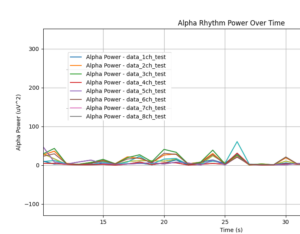
Be sure that you don’t have any spikes
3. Prepare the Data for DL
Combine the stress and non-stress datasets into a single Excel file. Add an extra column labeled “Stress Indicator” to identify each entry:
For stress: enter 1 in the “Stress Indicator” column.
For non-stress: enter 0 in the “Stress Indicator” column.

4. Train the Classifier:
Use this DL script to train a model and classify stress levels based on EEG data. I have used Keras library
And you finally receive the next result
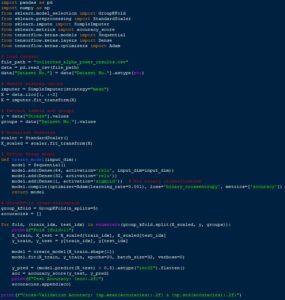
Test Accuracy 0.81
Cross-Validation Accuracy 0.67 +_ 0.22
🚀 Enjoy building your classifier!
Would you like to receive news?